SmartMovie at a glance
SmartMovie is a collection of two software programs – one of them – PC Converter – allows you to convert video clips from your desktop PC to a format playable on a mobile device, and other – Mobile Player – allows you to playback the converted video on your mobile device.
Here we’ll come through basic steps to learn about how to proceed during conversion of video files for playback on your wireless device.
You can play back movies from PC, as well as video clips recorded by the device (if they’re in compatible format). The clips recorded on your device typically won’t need conversion step using the SmartMovie Converter, and should be directly playable.
Requirements
Following are minimal requirements for SmartMovie Converter to work:
- PC with Windows
- Mobile device supported by SmartMovie version that you’re using
- Memory card, depending on its capacity you’ll be able to create and upload videos of different sizes
Installation
After downloading SmartMovie software, you’ll need to install both PC Converter as well as mobile Player.
Extract files from downloaded ZIP file into a temporary directory and run Setup.exe to install SmartMovie Converter. Then run it by clicking its icon on desktop or in Start Menu.
Then install video player on your mobile device. Depending on platform, it requires installing SIS/SISX file on Symbian, or running Setup.exe from inside “Player” folder to install player on Windows Mobile device.
Video conversion on PC
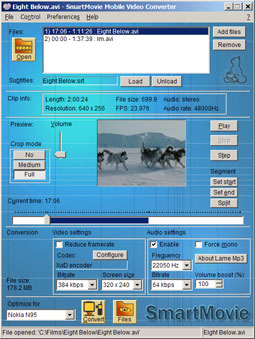
Click Open button to locate your video file on the file system (hard disks, CD, network drives, etc), or drag video file onto Converter’s window. If video format is recognized, the file is opened, and you may start preview it and/or convert it.
If video clip can’t be opened, you may need to install codecs on your PC.
Set up conversion parameters. You can select your target device, and most parameters will be configured to optimal settings. If you can’t find your device model in the list, then select any similar device type with same screen resolution. After selecting device model, you can still adjust the settings as needed.
If you want to fit your clip to memory card of particular size, follow the projected size of converted file and adjust parameters (video/audio bitrate) to make it fit in required size.
Click Convert button to start conversion. The conversion will be run, and progress indicator will tell you how far it is.
Transferring converted video to mobile device
There are several ways to copy converted video file to the device:
- If you can connect your device to PC in USB data transfer mode, you can copy video to device’s memory card directly. This may be the fastest way.
- You may use memory card reader/writer to write the video file onto the memory card.
- Use the software which came with your device (PC Suite, PC Studio, Activesync, etc) to upload the file onto your device.
Playback on device
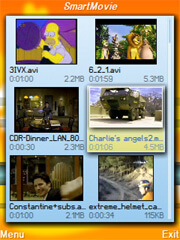
- Install SmartMovie player on the device and run the player by clicking its icon
- All video files found on device should be automatically visible in SmartMovie file browser. Click on file to start playback
Working with SmartMovie PC Converter
You can open one or more files in the Converter, and prepare it for converting the files. Then all prepared files may be converted without user intervention.
If you convert video files overnight, you can press button “Shutdown PC after conversion”, so that PC shuts down after finishing the work. This button becomes visible only after the conversion process is started.
To learn more about SmartMovie Converter, click “?” item at the menu (after this cursor changes to arrow with question mark), and click any control on Converter’s window. You’ll get explanation of meaning of clicked item.
Define time segment in file to be converted
You may see and adjust the time range of file which will be converted in the Time bar at the bottom of Converter’s window. The bar represents entire video length, and blue-filled part in the bar represents selected time range, that will be converted.
You may adjust the range in two ways:
- Select time, and click Set start or Set end buttons to setup start/end time
- Hold down Shift key while dragging the slider on the time bar to set start or end time (the one which is closer to the slider)
If you choose Sticky segments in the Preferences, then adjusting time of one segment will automatically adjust neighbor time in adjacent segment of the same file.
Subtitles
SmartMovie player can display video subtitles while playing video clip. The subtitles are stored in text format (this means they are not drawn to video images during conversion, but they are stored in text form and drawn as text during playback).
If you use SmartMovie Converter to convert video file, it is recommended that you also load subtitles into the Converter, and let Converter to pack (store) subtitles text file into final video file. This way the subtitles will be transferred to device directly with video file.
Another option is to use external text file with subtitles in SUB format. SmartMovie player will find the subtitles text file if it has the same file name as the AVI file, but with .sub extension instead of .avi. You’ll have to upload both the AVI and the SUB file into the mobile device in order to see subtitles.
Note: if you see another small subtitles in converted video, this means that your installed video codec or DirectShow filter added the subtitles into converted pictures. SmartMovie Converter can’t detect or disable such behavior of installed codec, and you will have to find the codec’s configuration and disable the subtitles yourself. Usually the codec settings are accessible in taskbar area in bottom-right of screen. In most cases it will be ffdshow codec or VobSub filter which draws subtitles into video, and you should disable this option before converting video in SmartMovie Converter.